BallEngine
Start free

Grid Merge:
Two of the same become the next one

Pictures on a clean grid slide together and merge up a chain, one sound at a time, until one final form is left.
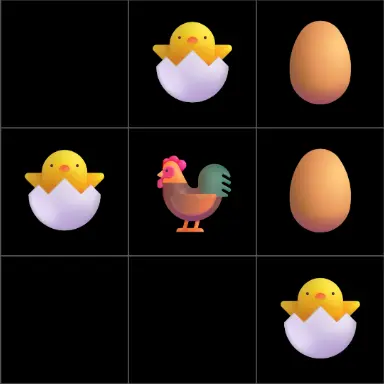
A frame from Grid Merge
Open the studio to run this mode live.

What Grid Merge does

A grid of pictures on a clean board. Two of the same slide together and become the next picture up, the empty cells refill, and the climb goes on until one final picture is left.

Grid Merge is a merge chain with nothing in the way. Pictures sit in the cells of a grid, two of the same slide together, and on the frame they meet they become the next picture in the chain. Pieces keep their size, so the story is the picture changing, not the piece growing.

Every phase merges down to one piece in the middle. Then the cells around it refill row by row and the climb carries on, so the run always ends the same way: one final picture alone on the board.

Every merge and every refill plays its own sound. The small merges trade two notes back and forth, the big ones step higher, and the last merges climb the whole ladder to the final form.

How a run plays out

The exact sequence the engine runs in this mode, from the first frame to the moment the run resolves.
  1. 1.

    Two of the same make the next one

    Equal pieces that sit next to each other merge, one sliding onto the other in a single move. The whole run is planned so the next twin is already next door, and the biggest piece stays in the middle of the grid.

  2. 2.

    Pieces keep their size

    A merge changes the picture and leaves the size alone, so a full grid and an empty one read the same way. Size growth per merge is there if you want it.

  3. 3.

    Empty cells refill

    Every phase ends on one piece in the middle. Only then do new pieces fill the cells around it, row by row by default, and the merging starts again.

  4. 4.

    One final form

    New pieces start bigger in each later phase, so the count is always exact. A chain of six takes three phases and 23 merges, and lands on one final form with nothing left over.

Every control in Grid Merge

These are the settings this mode adds on top of the shared physics, visual, audio, and export controls. Names match the studio sidebar exactly.

The grid

  • Rows
  • Columns
  • Grid size
  • Space between cells
  • Board colour
  • Show cell lines

The default three by three grid fills a square video. The grid fits every video shape.

The chain

  • Pieces in the chain
  • Each piece shows
  • Remove image backgrounds
  • Piece size
  • Size growth per merge

Each extra piece adds one phase to the run. The grid needs at least one cell per piece.

Merges

  • Which pair merges next
  • Slide time (sec)
  • Wait between merges (sec)
  • Slide motion
  • Hop while sliding

A steady slide with a short rest between merges keeps a clean rhythm.

New pieces

  • How empty cells refill
  • Wait before a refill (sec)
  • How a new piece appears
  • Last piece fade (sec, 0 = like the others)
  • Closing merges slow down

New pieces arrive only when one piece is left in the middle.

Sound

  • Merge sound
  • Small merges take turns
  • New piece sound
  • Last piece sound
  • Final form sound

Every merge has its own row, where you can pick a sound from the library or upload one.

Why Grid Merge videos hold attention

What keeps people watching this mechanic.

A visible goal

The board keeps emptying and refilling around bigger and bigger pieces, and viewers stay to see what the last picture is.

A tune out of the merges

One note per merge turns the run into a small melody that repeats and climbs, which is easy to keep watching.

A clean frame

Nothing but the pictures on a plain board. It reads at a glance, even on a small screen with the sound off.

A closing climb

The last merges slow down and step up one by one, so the ending is felt coming.

Videos you can make in this mode

Each of these is a different configuration of the same mode, so one setup session produces a batch of related uploads.

Your own pictures

One cut-out per piece, such as a pet, a character or a product, merging up to the one you want to finish on.

Evolution chain

An egg to a parrot, a seed to a tree: a chain people recognise without any explanation.

Number doubling

Numbers that double with each merge, for a 2048 style climb on a real grid.

Square or vertical

A square video with the grid filling the frame, or a vertical one with the grid across the middle.

Make your first Grid Merge video

The order that works. Following it out of sequence usually means retuning settings you already set.
  1. 1.

    Pick the chain

    Six pieces run about 25 seconds on the defaults, and each extra piece adds about 9 seconds.

  2. 2.

    Add your pictures

    Choose your images smallest first and put the whole group on the chain in one tap.

  3. 3.

    Pick the shape

    Square fills the frame with the grid. Vertical leaves room for a title above it.

  4. 4.

    Set the sounds

    Keep the defaults, or give any merge a sound of its own from the library or an upload.

  5. 5.

    Fit it to your clip

    Generate a seed for the clip length you want, and the run lands the final form on that second.

Settings that make the difference

  1. Use pictures with a plain background, so Remove image backgrounds can cut them out cleanly.
  2. Keep the pictures clearly different from one step to the next, so each merge is easy to read.
  3. Leave the effects off for a clean look, or add a small Pop on landing if you want the merges to punch.
  4. Keep Which pair merges next on Smart for the tidiest run: one move per merge, with the biggest piece in the middle.

What breaks a run

  1. A chain too long for the clip: each extra piece adds a phase, so the pace has to rise to fit.
  2. Pictures so alike that the viewer cannot see anything change on a merge.
  3. Every effect on every merge, which buries the clean look that makes this format work.

Why a merge on a grid works

With no physics to watch, all the attention goes to what the pictures become. Each merge is one clear step, on a steady beat, and the viewer always knows what is about to happen next without knowing how the chain ends.

The refills are what keep it going. Just as the board empties, it fills up again around the pieces already earned, so progress stays on screen while the work starts over.

Grid Merge questions

Open Grid Merge

Every control on this page is already in the studio. Load the mode and start from a working run.