BallEngine
Start free

Merge Evolution:
Two of the same make the next one

Small pieces pour into the arena and merge up a chain, bigger every time, until the final form appears.
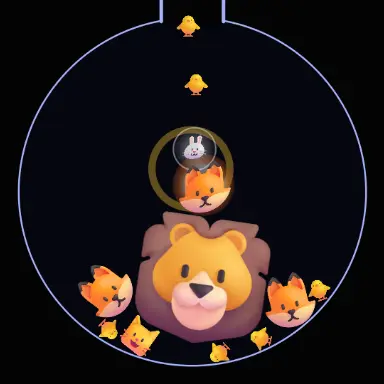
A frame from Merge Evolution
Open the studio to run this mode live.

What Merge Evolution does

A spout pours small pieces into a round arena, and any two of the same that touch merge into the next one up, bigger every time, until the final form appears.

Merge Evolution is a chain with a goal. The smallest piece pours in from a spout at the top of the ring, and whenever two of the same piece touch they merge into the next one up the chain: chick, rabbit, cat, fox, bear, cow, lion, dragon. Each step is bigger than the last, so the arena fills with fewer, larger pieces as the run climbs.

Every merge is an event. A glow ring follows the new piece, a thin shock ring spreads out, the big merges flash and throw light rays, and the last few shake the screen. When the final form arrives it sits in golden rings while the arena warms up around it.

The pieces are real engine balls, so your global physics, ball size, skin, arena and RGB border all apply. Each piece can show an emoji, your own image, a number that doubles with every merge, or just the ball itself.

How a run plays out

The exact sequence the engine runs in this mode, from the first frame to the moment the run resolves.
  1. 1.

    Two of the same make the next one

    Pieces that match and touch merge into the next piece in the chain. Different pieces just bounce off each other.

  2. 2.

    Every step is bigger

    Each merge grows the piece by a set factor, so the arena crowds with small pieces early and holds a few giants late.

  3. 3.

    The spout keeps it fed

    New small pieces pour in at a steady rate and pause when the arena is full, so the chain always has material to climb with.

  4. 4.

    The final form ends the run

    The last piece in the chain never merges again. It is held on screen for a moment, then the run starts over.

Every control in Merge Evolution

These are the settings this mode adds on top of the shared physics, visual, audio, and export controls. Names match the studio sidebar exactly.

The chain

  • Pieces in the chain
  • Each piece shows
  • Piece colours
  • Size growth per merge

Size growth per merge decides how fast the arena changes from crowded to sparse. Larger steps make each merge feel bigger.

Falling pieces

  • Fall speed
  • Gravity
  • Pieces poured per second
  • Most pieces at once
  • Pour speed
  • Biggest piece poured in

Fall speed sets how fast pieces drop, the pour sets how many. A faster pour reaches the final form sooner. Pouring only the smallest piece makes the whole climb visible.

Merge effects

  • Merge effect
  • Effect pool
  • Glow ring
  • Shock ring
  • Flash
  • Light rays
  • Shake on big merges
  • Final form rings

Effects scale with the merge, so small merges stay quick and the late ones land hard.

Sound

  • Merge sound
  • Speed of the first merge
  • Speed of the final form
  • Reverb on the slow merges

One sound plays fast and high on small merges and slow with reverb on the big ones, so the climb is audible.

Why Merge Evolution videos hold attention

What keeps people watching this mechanic.

A visible goal

Viewers know the run is climbing toward a final form, and they stay to see it arrive.

Near misses

Two matching pieces drifting close without touching build tension that resolves the moment they meet.

Escalating payoffs

Each merge is bigger and louder than the one before, so the video gets more intense the longer it runs.

Familiar pieces

An animal chain or your own images makes the progression readable at a glance, with no explanation needed.

Videos you can make in this mode

Each of these is a different configuration of the same mode, so one setup session produces a batch of related uploads.

Animal chain

The default emoji chain from chick to dragon. The clearest version of the format.

Number doubling

Numbers that double with each merge, for a 2048 style climb.

Your own images

One picture per piece, such as logos, characters or products, merging up to the one you want to finish on.

Slowed and reverb

One merge sound shaped from fast to slow so the final form lands on a deep, reverbed hit.

Make your first Merge Evolution video

The order that works. Following it out of sequence usually means retuning settings you already set.
  1. 1.

    Pick the chain length

    Fewer pieces reach the final form sooner. Eight is a good length for a 60 second video.

  2. 2.

    Choose what pieces show

    Emoji, your own images or numbers. Keep each step clearly different from the last.

  3. 3.

    Set the pour

    A steady pour of the smallest piece keeps the climb readable from the first merge.

  4. 4.

    Shape the sound

    Pick one merge sound and let it slow down as the pieces grow.

  5. 5.

    Hold the final form

    Give the last piece a few seconds on screen before the restart, so the ending lands.

Settings that make the difference

  1. Equal pieces drift together helps matching pieces find each other, so a run never stalls with two lonely pieces on opposite sides.
  2. Keep effects on the big merges and light on the small ones; the contrast is what makes the end feel earned.
  3. A darker arena makes the glow rings and light rays read better.
  4. Plan the video length around the chain: about a minute for the default eight pieces.

What breaks a run

  1. A size growth per merge so large that the last pieces cannot fit in the arena.
  2. Pouring big pieces from the start, which skips the satisfying early merges.
  3. Every effect at full strength on every merge, which leaves nothing for the final form.

Why a merge chain holds attention

A merge chain gives the viewer a destination. From the first merge it is clear the pieces are climbing toward something, and the open question is how long it takes and what the last one looks like.

Because each merge needs two matching pieces to meet, the pacing is uneven in a good way: quick bursts of merges, then a pause while two pieces drift toward each other. That rhythm is what keeps people watching between the big moments.

Merge Evolution questions

Open Merge Evolution

Every control on this page is already in the studio. Load the mode and start from a working run.