BallEngine
Start free

Magnet 3D:
More power every phase

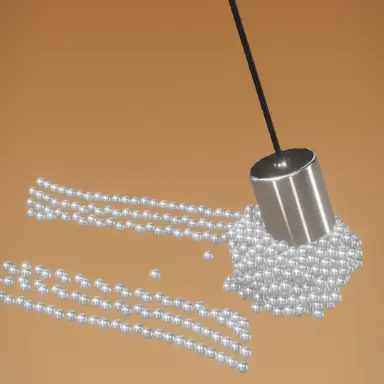
A steel magnet swings over a carpet of steel balls, a little stronger each time, until the balls pack it into a ball of steel.
A frame from Magnet 3D
Open the studio to run this mode live.

What Magnet 3D does

A stainless steel magnet swings on a rod over a carpet of steel balls, a little stronger every phase, until the balls pack it into a ball of steel. Then the power cuts.

Magnet 3D is a power ramp. A polished stainless cylinder hangs on a steel rod over a square carpet of steel balls, in a warm studio. The run is a row of phases, Magnet power ×1 up to ×6, and every phase is one full swing of the pendulum: from the right, over the carpet to the left and back. Each phase starts on a fresh carpet, like the next take of a video.

The swing never changes. Only the power does. At ×1 the balls under the magnet only ripple. At ×2 a strip of the carpet peels up. The balls magnetise each other, so the carpet lifts like a sheet and balls hang off balls. By ×6 most of the carpet is packed round the magnet.

Then the screen says Magnet off. The power cuts as the magnet swings over the middle, the whole catch pours onto the floor in a heap, and the empty magnet swings away. With the default 6 phases of 4.5 seconds and 3 seconds for the drop, one run is 30 seconds.

How a run plays out

The exact sequence the engine runs in this mode, from the first frame to the moment the run resolves.
  1. 1.

    A steel magnet over a carpet of steel balls

    A stainless cylinder on a dark steel rod hangs above a square carpet of polished balls, in a warm seamless studio. The camera follows the swing a little and never zooms.

  2. 2.

    Every phase is the same swing

    Each phase is one full swing: from the right, over the carpet to the left and back. It starts on a fresh carpet and the new power eases in.

  3. 3.

    The power climbs every phase

    Magnet power ×1 only ripples the carpet. At ×2 a strip peels up, and by ×6 most of the carpet is packed onto the magnet.

  4. 4.

    Magnet off

    After the last phase the power cuts over the middle. The whole catch pours onto the floor and the empty magnet swings away.

Every control in Magnet 3D

These are the settings this mode adds on top of the shared physics, visual, audio, and export controls. Names match the studio sidebar exactly.

Programme and shapes

  • Programme & shapes
  • Programme
  • Magnet shape
  • Magnet size
  • Object shape
  • Show magnet

Ten magnet shapes, from the Steel Cylinder to the red Horseshoe, and twelve pieces, from steel balls to nails. Each pair packs onto the magnet in its own way.

Power ramp

  • Power ramp
  • Power steps
  • Swing seconds
  • OFF payoff (sec)
  • Power label

Power steps is how many phases the run has, Swing seconds is how long each one lasts, and OFF payoff is the time left for the drop at the end.

The field

  • The field
  • Strength
  • Lift height
  • Reach
  • Clump tightness

Strength is how hard the magnet pulls at full power. Reach is how far down into the bed the pull gets. Clump tightness decides how close the pieces pack.

Objects, colour and audio

  • The objects
  • Object count
  • Object size
  • Gravity
  • Bounciness
  • Color
  • Color mode
  • Object tint
  • Second tint
  • Magnet body
  • Override audio

The default is polished black steel; the other tints are natural iron colours. Magnet body paints the horseshoe, the bar and the pot magnet. The audio is real metal clinks and a fall.

Why Magnet 3D videos hold attention

What keeps people watching this mechanic.

The number tells you what is coming

Magnet power ×3 over Phase 3 of 6 says how far into the run you are and that the next pass will pull harder.

Each pass is a clear comparison

Because the swing never changes, the viewer can see exactly how much more the magnet picks up than last time.

The first jump is a hook

Two phases of tugging set up the moment the first pieces leave the bed. People wait for it.

The drop pays it all off

A ball of steel pouring off the magnet onto the floor is the release the whole ramp builds to.

Videos you can make in this mode

Each of these is a different configuration of the same mode, so one setup session produces a batch of related uploads.

The full ramp

Default settings: six phases, ×1 to ×6, then Magnet off. 30 seconds.

Horseshoe and cubes

The red horseshoe with Steel Cubes, so the swarm hangs off its two tips.

Encased ball

The Hanging Ball with Ball Bearings. By the last phase the magnet disappears inside the steel.

Short ramp

Four power steps for a quicker clip that still climbs to a full magnet.

Electromagnet

The copper coil with Rounded Blocks for a heavier, industrial look.

Randomize

Every roll picks a magnet, a piece and a steel finish, and always fills 30 seconds.

Make your first Magnet 3D video

The order that works. Following it out of sequence usually means retuning settings you already set.
  1. 1.

    Watch the default run

    Six phases and the drop. It shows the whole format in 30 seconds.

  2. 2.

    Pick a magnet and a piece

    Change Magnet shape and Object shape. The pairing decides what the clump looks like at ×6.

  3. 3.

    Set the ramp

    Power steps and Swing seconds set the length. The line under them shows the total run time.

  4. 4.

    Keep the power label on

    The number on screen is what turns eight passes into a climb the viewer can follow.

  5. 5.

    Tune the pull

    If the bed lifts too early or too late, change Strength or Reach.

Settings that make the difference

  1. Keep Power label on. Magnet power ×3 over Phase 3 of 6 is what makes each pass mean something.
  2. Keep the magnet visible. Iron flying up to nothing reads as a glitch.
  3. Horseshoe and Bar Magnet hold pieces at their ends, so the catch grows two clumps instead of one ball.
  4. Leave a few seconds of OFF payoff. The catch pouring off the magnet is the end of the story.
  5. One stainless tint keeps it looking real. Bright colours make it look like plastic.

What breaks a run

  1. Turning off the power label, so the six passes look the same.
  2. Setting OFF payoff to 0, which cuts the video before the catch falls.
  3. Too much Strength, so the bed jumps up at ×1 and there is nothing left to build to.
  4. Too many objects at a large size, so the bed fills the frame and the magnet gets lost.

Why every phase is the same swing

The magnet does exactly the same pass in every phase: one full swing from the right, over the carpet to the left and back, on a fresh carpet. That repetition is on purpose.

When the movement never changes, the only thing that changes is the power, so the viewer can compare phase to phase. At ×1 the carpet only ripples. At ×3 a sheet of balls peels up. At ×6 the magnet is buried. The difference is easy to see because nothing else moved.

The camera only follows the swing a little and never zooms, for the same reason.
Why the run ends with the power cut

Six phases of building need an ending. The last swing carries the biggest catch, and as the magnet passes over the middle the power cuts.

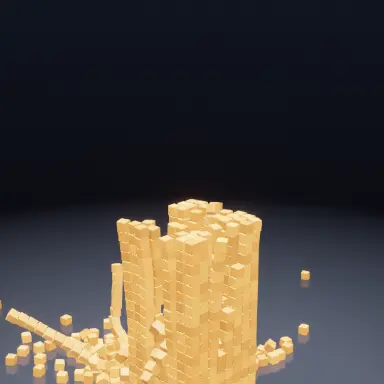
The whole ball of steel pours onto the floor in one heap while the empty magnet swings away and is lifted out of the way. The same gravity that held the carpet down for six phases wins at the end.

With the default settings the drop starts just after 28 seconds and the run ends at 30, so the whole story fits one default clip.

Magnet 3D questions

Open Magnet 3D

Every control on this page is already in the studio. Load the mode and start from a working run.